

Many users focus their attention on “how to get more traffic” while overlooking whether their foundational setup before promotion is complete. In reality, only once necessary in-product configuration is done To start recruiting affiliates and promoting your product through PartnerShare, complete the following steps:
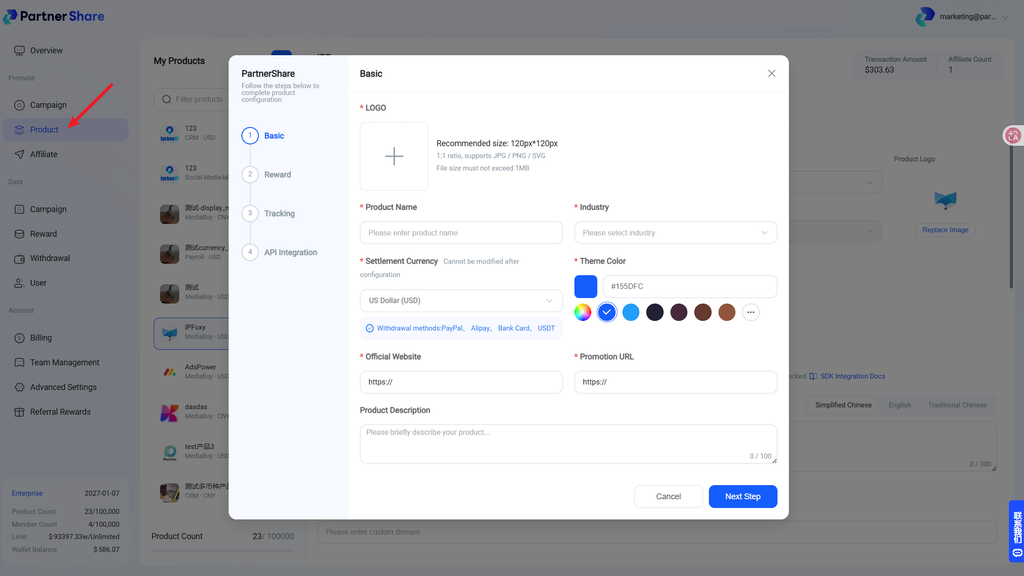
1. Create Your Product
Create a product in PartnerShare and provide the required information, including the product name, website, description, and promotional details.
Make sure the information is accurate and complete so affiliates can quickly understand what your product offers.
2. Deposit $50 into Your Account
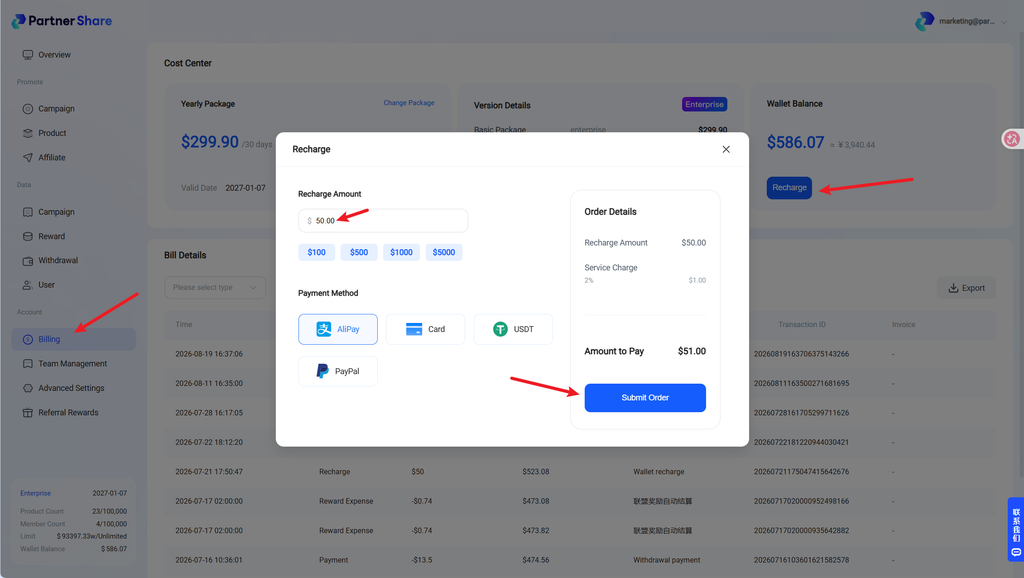
After creating your product, deposit at least $50 into your PartnerShare account.
This amount serves as the initial reward budget for PartnerShare affiliates who promote your product. A sufficient account balance ensures that eligible affiliate rewards can be paid successfully.
3. Contact Our Business Team
Once your product has been created and the $50 deposit is available, contact the PartnerShare business team.
Our team will review your product and help list it on the PartnerShare Affiliate Marketplace, where affiliates can discover it and apply to promote it.


