

To view partner withdrawal requests and track the processing status of each one, go to the Withdrawal Management page.
A clear navigation bar at the top lets you quickly filter requests by status. Below is what each status means:
Withdrawal request status explained
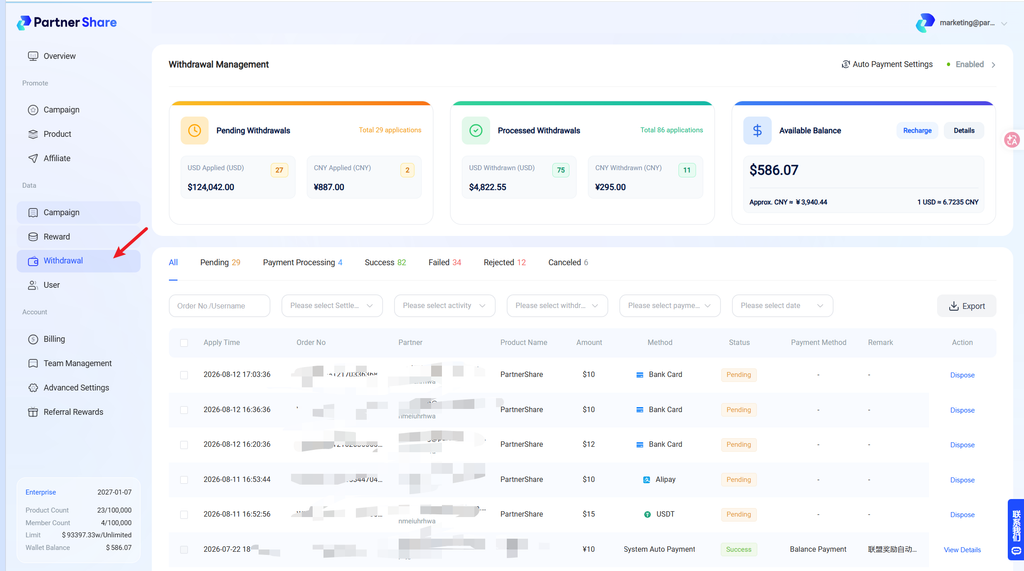
1. Pending When a partner submits a withdrawal request, the system generates a “Pending” record. This means the request hasn’t been reviewed yet — the brand owner needs to go to Withdrawal Management to review it and decide whether to disburse the reward.
2. Processing payment Once the brand owner approves the request, the status updates to “Processing Payment.”
Notes:
- The request has passed review.
- The actual payment/transfer is underway.
- Please wait patiently in this state and avoid repeating the operation.
3. Withdrawal successful Once the payment completes and the system confirms the funds were successfully disbursed, the status updates to “Withdrawal Successful.”
Notes:
- The commission has been successfully paid to the partner.
- This withdrawal process is complete.
- No further action can be taken on it.
4. Rejected If the brand owner doesn’t approve the request, the status changes to “Rejected.”
Notes:
- The request did not pass review.
- No commission will be disbursed.
- We recommend adding a note when rejecting, so the partner understands why.
5. Payment failed If the request was approved but something went wrong during actual payment (e.g., payment channel failure, incorrect account info), the status shows “Payment Failed.”
Notes:
- Payment was not successfully completed.
- The brand owner can retry based on the failure reason, or contact the partner to confirm their info.
6. Cancelled If a partner proactively cancels their withdrawal request before the brand owner processes it, the status updates to “Cancelled.”
Notes:
- A new withdrawal request can be submitted afterward.
- The request has been cancelled.
- No payment or review process will be triggered.


